Mi Control Center
Efficient toggles with sleek design
Efficient toggles with sleek design
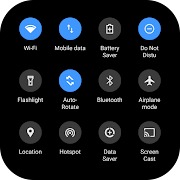
Mi Control Center brings a refreshing take on control utilities with its eye-catching style and impressive customizability. Its design is both aesthetic and functional, offering users a unique control hub experience that perfectly balances simplicity and sophistication.
The standout feature of Mi Control Center lies in its highly customizable interface. With two distinct layout options available, you can tailor your environment to match your personal taste. Whether you favor a compact arrangement for quick access or a more spacious layout to accommodate a broader range of controls, this app adapts to your style seamlessly. The intuitive design makes tweaking settings a breeze, ensuring that both everyday tasks and specialized adjustments feel natural and smooth.
Yet, like any tool aiming for perfection, Mi Control Center isn't without a few quirks. Users have noted that the brightness slider can occasionally be a bit buggy. While this issue might disrupt the flawless control experience momentarily, it doesn't overshadow the overall performance and versatility of the application. The innovative approach to integrating multiple control options within a single, streamlined interface is something few other apps can boast.
In essence, Mi Control Center manages to blend aesthetic elegance with functional depth in a way that makes controlling system settings a visually pleasing and hassle-free experience. It’s a testament to thoughtful design, offering a refreshing alternative for anyone looking to enhance their control environment with style and practicality. This app is a top contender for those seeking a modern, customizable control center that doesn’t sacrifice looks for functionality, even if minor hitches occur from time to time.
Developer
ZipoApps
OS
Version
18.5.13
License
Free
Similar to Mi Control Center